

Get up-to-date Real Exam Questions for MS-740 UPDATED [2023]
Pass Microsoft MS-740 Exam in First Attempt Guaranteed
How to Register For Exam MS-740: Troubleshooting Microsoft Teams (beta)?
NEW QUESTION # 32
You need to resolve the chat notification issue.
Which three actions should you perform? Each correct answer presents part of the solution.
NOTE: Each correct selection is worth one point.
- A. In the Windows settings Notifications & Actions menu, enable notifications.
- B. Reinstall Microsoft Teams.
- C. In Registry Editor, navigate to Computer\HKEY_CURRENT_USER\SOFTWARE\Microsoft\Office\Teams. Create a registry key named ChatNotifications and set the value to 1.
- D. Update Microsoft Teams to the latest version.
- E. On the Microsoft Teams Settings Notifications page, enable notifications.
Answer: A,D,E
Explanation:
Reference:
https://support.microsoft.com/en-us/office/manage-notifications-in-teams-1cc31834-5fe5-412b-8edb-43fecc78413d
https://support.microsoft.com/en-us/windows/change-notification-and-action-settings-in-windows-10-8942c744-6198-fe56-4639-34320cf9444e
NEW QUESTION # 33
You manage the Microsoft Teams environment for a company.
The company has federation configured only for the human resources (HR) department, and only with Vendor A. User1, who is part of the HR department, cannot communicate with VendorA.
You need to troubleshoot why User1 cannot communicate with VendorA.
What should you do?
- A. Ensure that federated access is enabled in the external access policy for the user.
- B. Ensure the target domain for VendorA is listed in the Allowed Domains list.
- C. Ensure the user is added as a guest in the VendorA tenant.
- D. Ensure the tenant is enabled for federation.
- E. Ensure that federated access is enabled in the external user communication policy for the user.
Answer: A
Explanation:
Reference:
https://docs.microsoft.com/en-us/skypeforbusiness/set-up-policies-in-your-organization/create-custom-external-access-policies
NEW QUESTION # 34
A company wants to use the Microsoft Call Quality Dashboard (CQD) to monitor and investigate calls.
You need to provide guidance on how to use the CQD.
Which action can you perform by using the CQD? To answer, drag the appropriate responses to the statements. Each response may be used once, more than once, or not at all. You may need to drag the split bar between panes or scroll to view content.
Answer:
Explanation:
Reference:
https://docs.microsoft.com/en-us/microsoftteams/quality-of-experience-review-guide
NEW QUESTION # 35
A company uses Microsoft Teams.
The company must obtain a copy of all messages from a private channel named Project1. The private channel is part of a team named Finance.
You need to obtain a compliance copy of all messages sent in Project 1.
What should you do? To answer, select the appropriate options in the answer area.
NOTE: Each correct selection is worth one point.
Answer:
Explanation:
NEW QUESTION # 36
A manager wants to review Microsoft Teams call quality metrics for all IT company employees.
You need to grant the manager access to the Microsoft Teams Call Quality Dashboard.
Which role should you assign to the manager?
- A. Teams Communications Support Engineer
- B. Teams Communications Administrator
- C. Teams Communications Support Specialist
- D. Teams Service Administrator
Answer: C
Explanation:
Reference:
https://docs.microsoft.com/en-us/microsoftteams/using-admin-roles
NEW QUESTION # 37
A company uses Microsoft Teams.
You need to configure email channel settings for the company.
Where should you perform each task? To answer, drag the appropriate locations to the correct requirement. Each location may be used once, more than once, or not at all. You may need to drag the split bar between panes or scroll to view content.
NOTE: Each correct selection is worth one point.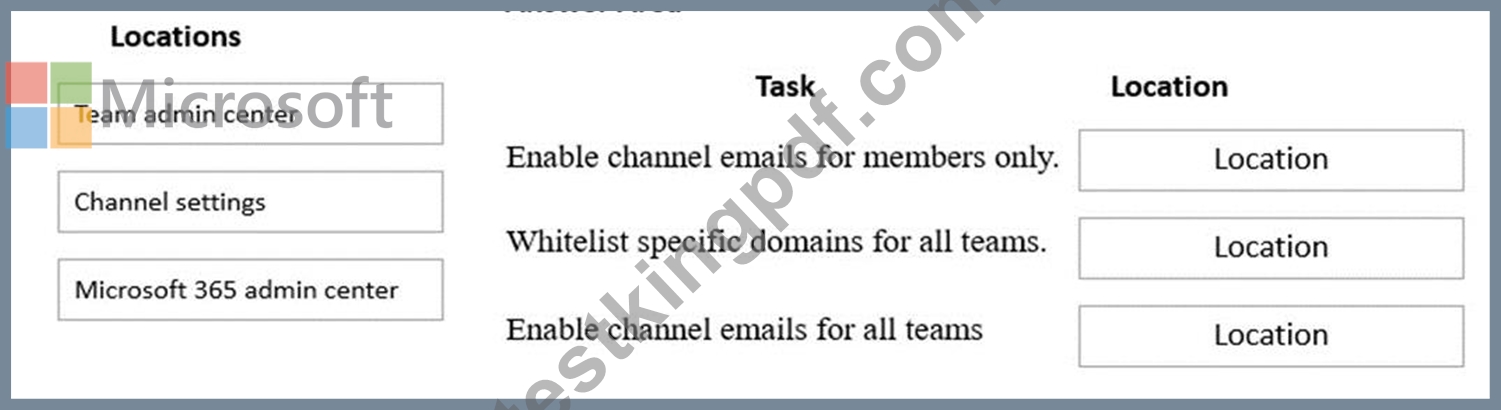
Answer:
Explanation:
Reference:
https://support.microsoft.com/en-gb/office/manage-who-can-send-email-to-a-channel-in-teams-4f1a1224-e71b-45de-8f68-8e08f7874fa9
https://docs.microsoft.com/en-us/microsoftteams/enable-features-office-365
NEW QUESTION # 38
You manage the Microsoft Teams environment for a company. You configure direct routing telephony.
A user reports that the dial pad does not appear in their Teams app.
You need to resolve the issue. You assign the user a phone system license.
What should you do? To answer, select the appropriate options in the answer area.
NOTE: Each correct selection is worth one point.
Answer:
Explanation:
Reference:
https://docs.microsoft.com/en-us/microsoftteams/manage-voice-routing-policies
https://docs.microsoft.com/en-us/microsoftteams/direct-routing-enable-users
https://docs.microsoft.com/en-us/microsoftteams/direct-routing-plan
NEW QUESTION # 39
An organization's users work with third-party apps in Microsoft Teams.
New employees are not able to find and install third-party apps.
You need to resolve the issue.
What should you do?
- A. In the Org-wide app settings section of the Teams admin center, enable Allow interaction with custom apps.
- B. Assign an app permission policy that allows third-party apps.
- C. In the Org-wide app settings section of the Teams admin center, enable Allow third-party apps.
Answer: B
Explanation:
Reference:
https://docs.microsoft.com/en-us/microsoftteams/teams-app-permission-policies
NEW QUESTION # 40
You are managing a Microsoft Teams environment. You assign Audio Conferencing licenses to users. You configure a bridge number for the audio-conferencing bridge.
The audio-conferencing bridge number does not appear in meeting invitations that users create by using Microsoft Outlook.
You need to provision a new conferencing bridge number.
Which five actions should you perform in sequence? To answer, move the appropriate actions from the list of actions to the answer area and arrange them in the correct order.
Answer:
Explanation:
Reference:
https://docs.microsoft.com/en-us/microsoftteams/set-up-audio-conferencing-in-teams#step-2-get-and-assign-licenses
NEW QUESTION # 41
A company uses Microsoft Teams.
You need to prevent users from using a specific app within Teams.
What are two possible ways to achieve this goal? Each correct answer presents a complete solution.
NOTE: Each correct selection is worth one point.
- A. On the Permission policies page of the Teams admin center, create a custom policy and assign the policy to users.
- B. On the Enterprise applications page in the Azure Active Directory admin center, disable the app.
- C. On the Manage apps page of the Teams admin center, disable the app.
- D. On the Users page of the Azure Active Directory admin center, disable the app.
- E. On the Setup policies page of the Teams admin center, create a custom policy and assign the policy to users.
Answer: A,C
Explanation:
Reference:
https://docs.microsoft.com/en-us/microsoftteams/manage-apps#:~:text=In%20the%20left%20navigation%20of,(DoD)%20deployments%20of%20Teams.
https://docs.microsoft.com/en-us/microsoftteams/app-policies
NEW QUESTION # 42
A user works with two Microsoft 365 accounts on a domain-joined device. The user's device automatically signs in to Microsoft Teams by using a domain-joined account each time the user restarts their device.
The user must manually sign out from Teams and then enter credentials for the second account when they want to use the second account. Microsoft Teams must launch without the user signing in to an account.
You need to recommend a solution for the user.
What should you recommend?
- A. Configure Teams to use the Microsoft Authenticator app for authenticating users.
- B. Create the following registry key: (UPN) Computer\HKEY.CURRENT_USER\Software\Microsoft\Office\Teams SkipUpnPrefill(REG_DWORD) OxCXXXWOO! (1).
- C. Rename the following foWer and restart the machine: C:\users\Sdir\AppData\Local\Packages\MicrosoftAAD.BrokerPlugin_cw5n1h2txyewy C)
- D. Create the following registry key: (UPN) ComputeAHKEY_CURRENT_USER\Software\Microsoft\Office\16.0\Common\ldentity EnableADAL(REG.DWORD) OxOXKXK)001 (0).
Answer: B
NEW QUESTION # 43
When users attempt to delete a private channel in a Microsoft Teams environment the following error message displays:
You analyze the debug logs and see the following entry

Answer:
Explanation:
NEW QUESTION # 44
A company uses Microsoft Teams.
Users report that pinned apps disappear if they sign out of Teams.
You need to troubleshoot the issue.
Which policy should you check?
- A. Conditional access
- B. App setup
- C. Manage apps
- D. App permission
Answer: B
NEW QUESTION # 45
You need to validate the conditional access policy.
What should you conclude? To answer, select the appropriate options in the answer area.
NOTE: Each correct selection is worth one point.
Answer:
Explanation:
NEW QUESTION # 46
You are the global administrator of a tenant.
An account is blocked due to suspicious user activities.
You need to investigate the user activities.
Where should you investigate activities? To answer, drag the appropriate portals to the correct activities. Each portal may be used once, more than once, or not at all. You may need to drag the split bar between panes or scroll to view content.
NOTE: Each correct selection is worth one point.
Answer:
Explanation:
Reference:
https://docs.microsoft.com/en-us/microsoft-365/compliance/search-the-audit-log-in-security-and-compliance?view=o365-worldwide
NEW QUESTION # 47
You support a Microsoft Teams environment for a company.
A user is unable to share an uploaded file from their device in a chat with another user. The following error message displays:
You need to troubleshoot and resolve the issue. What is the cause of the issue?
- A. The user does not have a SharePoint license.
- B. The user exceeded their OneDrive storage quota.
- C. SharePoint permissions prevent the user from sharing the file.
Answer: C
NEW QUESTION # 48
User1 shares a Microsoft Word document with User2 during a Microsoft Teams chat session.
User2 is unable to make any changes to the document.
You need to determine the root cause of the issue.
What is the cause?
- A. A sensitivity label has been applied to the shared file.
- B. User2 does not have a Microsoft SharePoint license.
- C. User2 has view-only permissions for the document.
- D. The Microsoft Office package is not activated on User2's device.
Answer: A
Explanation:
Reference:
https://docs.microsoft.com/en-us/microsoft-365/compliance/sensitivity-labels?view=o365-worldwide
NEW QUESTION # 49
A company uses Microsoft Teams.
A user reports that they are unable to start recording a meeting.
You need to investigate the issue by reviewing the appropriate information.
What should you do? To answer, select the appropriate options in the answer area.
NOTE: Each correct selection is worth one point.
Answer:
Explanation:
NEW QUESTION # 50
You need to resolve the issue for the legal department employees.
What should you do?
- A. Set external sharing to Only people in your organization
- B. Grant the org-wide Teams Member group unique permission to the document library.
- C. Grant the org-wide Teams Member group permissions to the parent site of the Team.
- D. Set external sharing to Anyone.
Answer: B
NEW QUESTION # 51
You support a Microsoft Teams environment for a company. A member of a private channel reports that when they try to view files in the Files tab. the following message displays:
You need to recommend a solution to resolve the issue.
Which two recommendations can the member perform to achieve this goal? Each correct answer presents a complete solution.
NOTE: Each correct selection is worth one point.
- A. Remove and re-add the member to the channel.
- B. Set access permissions for the document library.
- C. Unassign and re-assign the user SharePoint license.
- D. Create a SharePoint address for the user.
Answer: A,D
NEW QUESTION # 52
You are the global administrator of a tenant.
An account is blocked due to suspicious user activities.
You need to investigate the user activities.
Where should you investigate activities? To answer, drag the appropriate portals to the correct activities. Each portal may be used once, more than once, or not at all. You may need to drag the split bar between panes or scroll to view content.
NOTE: Each correct selection is worth one point.
Answer:
Explanation:
Reference:
https://docs.microsoft.com/en-us/microsoft-365/compliance/search-the-audit-log-in-security-and-compliance?view=o365-worldwide
NEW QUESTION # 53
You manage the Microsoft Teams environment for a company.
The company has federation configured only for the human resources (HR) department, and only with Vendor A.
User1, who is part of the HR department, cannot communicate with VendorA.
You need to troubleshoot why User1 cannot communicate with VendorA.
What should you do?
- A. Ensure that federated access is enabled in the external access policy for the user.
- B. Ensure the target domain for VendorA is listed in the Allowed Domains list.
- C. Ensure the user is added as a guest in the VendorA tenant.
- D. Ensure the tenant is enabled for federation.
- E. Ensure that federated access is enabled in the external user communication policy for the user.
Answer: A
Explanation:
Reference:
https://docs.microsoft.com/en-us/skypeforbusiness/set-up-policies-in-your-organization/create-custom-external-access-policies
NEW QUESTION # 54
You are an administrator in an organization. You share files in chats with other users.
The users report that they are unable to access the files. Users see an error message as shown in the image:
You need to resolve the issue by updating the OneDrive for Business settings for the users. You navigate to the settings page for the Team's SharePoint site collection.
What should you do?
- A. Disable site policy.
- B. Enable Limited-access user permission lockdown mode.
- C. Enable document sets.
- D. Disable Limited-access user permission lockdown mode.
Answer: D
Explanation:
Reference:
https://docs.microsoft.com/en-us/sharepoint/troubleshoot/administration/access-denied-or-need-permission-error-sharepoint-online-or-onedrive-for-business
NEW QUESTION # 55
You manage the Microsoft Teams environment for a company.
A private channel is deleted. After 20 days, the channel owner restores the channel to retrieve a file. A user reports that they cannot access the SharePoint site for the channel.
You need to restore the SharePoint site that is associated with the private channel.
Which three actions should you perform in sequence? To answer, move the appropriate actions from the list of actions to the answer area and arrange them in the correct order.
Answer:
Explanation:
1 - Get-SPODeleteSite -IncludepersonalSite
2 - Restore-SPODeleteSite -Identity ""<URL>""
3 - Navigate to the private channel in Microsoft Teams....
NEW QUESTION # 56
You need to troubleshoot the Microsoft Teams performance. To answer select the appropriate options in the answer area.
NOTE: Each correct selection is worth one point.
Answer:
Explanation:
NEW QUESTION # 57
......
Microsoft MS-740 Study Guide Archives : https://www.testkingpdf.com/MS-740-testking-pdf-torrent.html
Pass MS-740 Exam Latest Practice Questions: https://drive.google.com/open?id=1qialYZ4kLrB2INnKwpXukiQYa2IrrcP1
